
Many JD Edwards administrators have experienced the frustration of recreating the same configuration multiple times.
A new User Defined Code (UDC) needs to be added to development, testing, and production. A set of report versions must be copied between environments. Security changes, task views, and configuration tables all need to stay synchronized. Too often, these changes are recreated manually or moved using a collection of scripts, spreadsheets, and custom processes.
Manual processes take time. More importantly, they increase the risk of inconsistencies between environments, making troubleshooting, testing, and future deployments more difficult.
The JD Edwards EnterpriseOne Configuration Assistant was designed to solve this problem.
Rather than rebuilding configuration objects one environment at a time, the Configuration Assistant allows administrators to package supported JD Edwards configuration into a portable archive that can be deployed consistently across multiple environments. Combined with Change Assistant—or, in newer Tools Releases, the EnterpriseOne web client—it provides a standardized way to move configuration while reducing manual effort and helping maintain consistency.
In this article, we'll explain what the JD Edwards Configuration Assistant is, what it can package, how the deployment process works, and when organizations should consider using it.
What Is the JD Edwards Configuration Assistant?
The JD Edwards EnterpriseOne Configuration Assistant is a standalone Java-based utility designed to package and deploy EnterpriseOne configuration.
Rather than copying individual objects or manually recreating configuration in another environment, administrators can define exactly what they want to include, package those items into a single portable archive (.par file), and deploy that archive wherever it's needed.
Instead of manually recreating the same configuration in every environment, administrators can build the package once and deploy it wherever it's needed. The result is a more consistent, repeatable process for moving supported configuration between development, testing, training, and production environments.
Oracle designed the Configuration Assistant for repeatability back in 2005 with EnterpriseOne Applications Release 8.11 SP1 and later. It can import and export configurations across releases, although cross-release deployments generate a warning because configuration structures may differ between releases.
What Can the Configuration Assistant Package?
| Configuration Type | What It Includes |
| Tables | Selected EnterpriseOne database tables and their business configuration data |
| User Defined Codes (UDCs) | UDC types and values |
| Versions | Batch and interactive report versions |
| Security | Public, role, and user security records |
| Task Views | Task master records and task relationships |
| OMW Projects and Objects | Object Management Workbench projects and supported objects. This can include UDO’s in later 9.2 tools releases |
How Does the Configuration Assistant Work?
The overall workflow is surprisingly straightforward.
Rather than manually copying individual configuration items, administrators build a reusable configuration definition that can be packaged and deployed whenever it's needed.
The process generally follows five simple steps.
Step 1: Create a Configuration
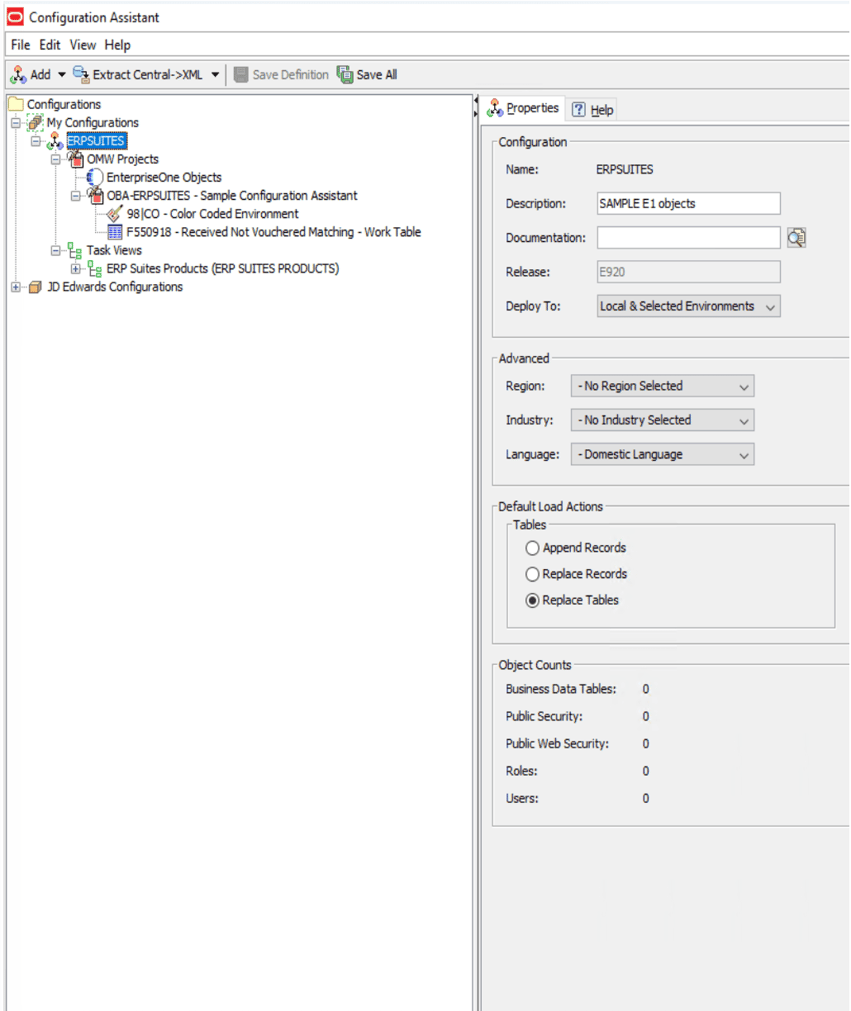
Every deployment begins by creating a new configuration under My Configurations.
Unlike Oracle's sample configurations—which are provided as read-only templates—My Configurations contains the custom configuration definitions you create and maintain. You can build a configuration from scratch or use Oracle's predefined configurations as a starting point before tailoring them to your organization's requirements.
Step 2: Select What to Include
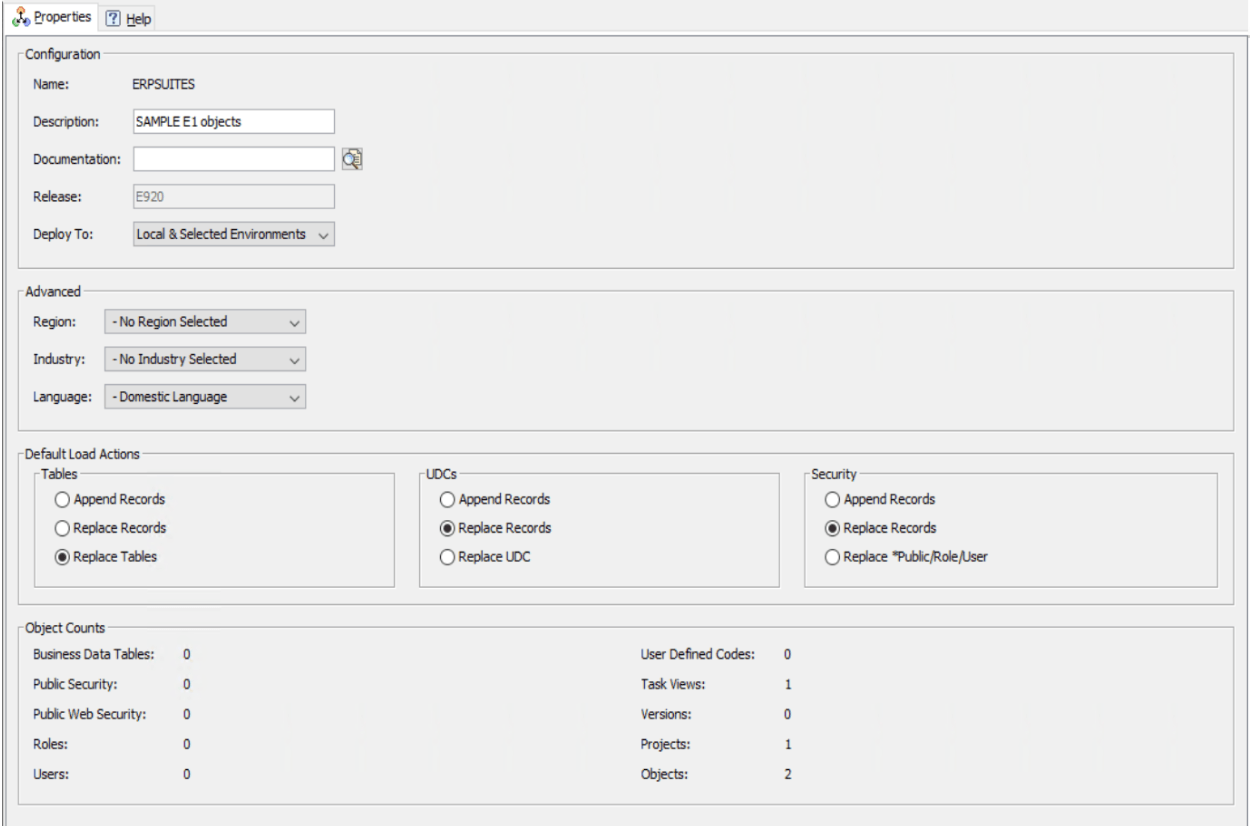
Next, choose the configuration objects that should be packaged.
Depending on your deployment, this could include selected tables, report versions, UDCs, security records, task views, or OMW objects.
During this stage, administrators also define how each object should be loaded into the target environment. For example, tables and UDCs can be configured to append records, replace records, or replace entire tables depending on the desired outcome.
Step 3: Save the Configuration
Once the configuration has been defined, save the configuration definition.
Saving doesn't deploy anything—it simply preserves the package definition, so it can be reused, modified, or extracted later.
Step 4: Generate the Portable Archive
After saving the configuration, extract it into a portable .par archive.
This archive contains the selected configuration and becomes the deployment package that will be imported into another EnterpriseOne environment.
Step 5: Deploy the Archive
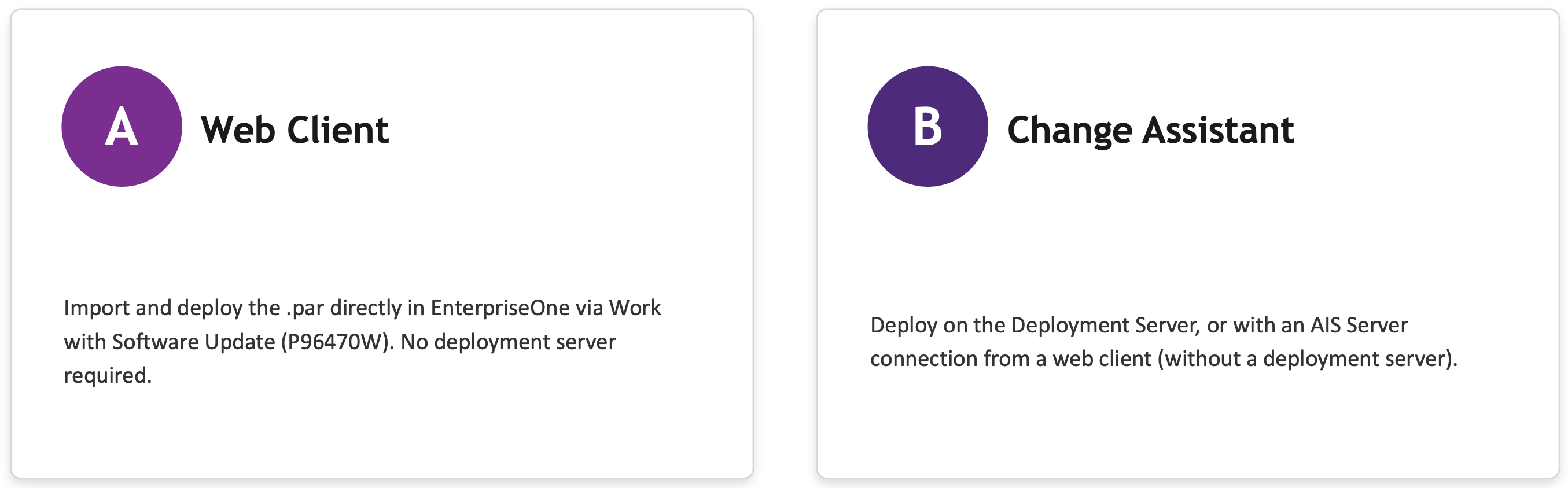
Finally, deploy the .par package into the target environment.
Depending on your Tools Release and deployment strategy, this can be done through either Change Assistant or the EnterpriseOne web client. Both options provide a standardized way to deploy supported configuration, although the best choice depends on your environment and deployment process.
How Are Configurations Deployed?
Once a configuration has been packaged into a portable .par archive, the final step is deploying it into the target EnterpriseOne environment.
Depending on your JD Edwards Tools Release and deployment strategy, Oracle provides two deployment options. Both accomplish the same goal—loading the packaged configuration into another environment—but they offer different approaches depending on your infrastructure and administrative preferences.
Option 1: Deploy Through the EnterpriseOne Web Client
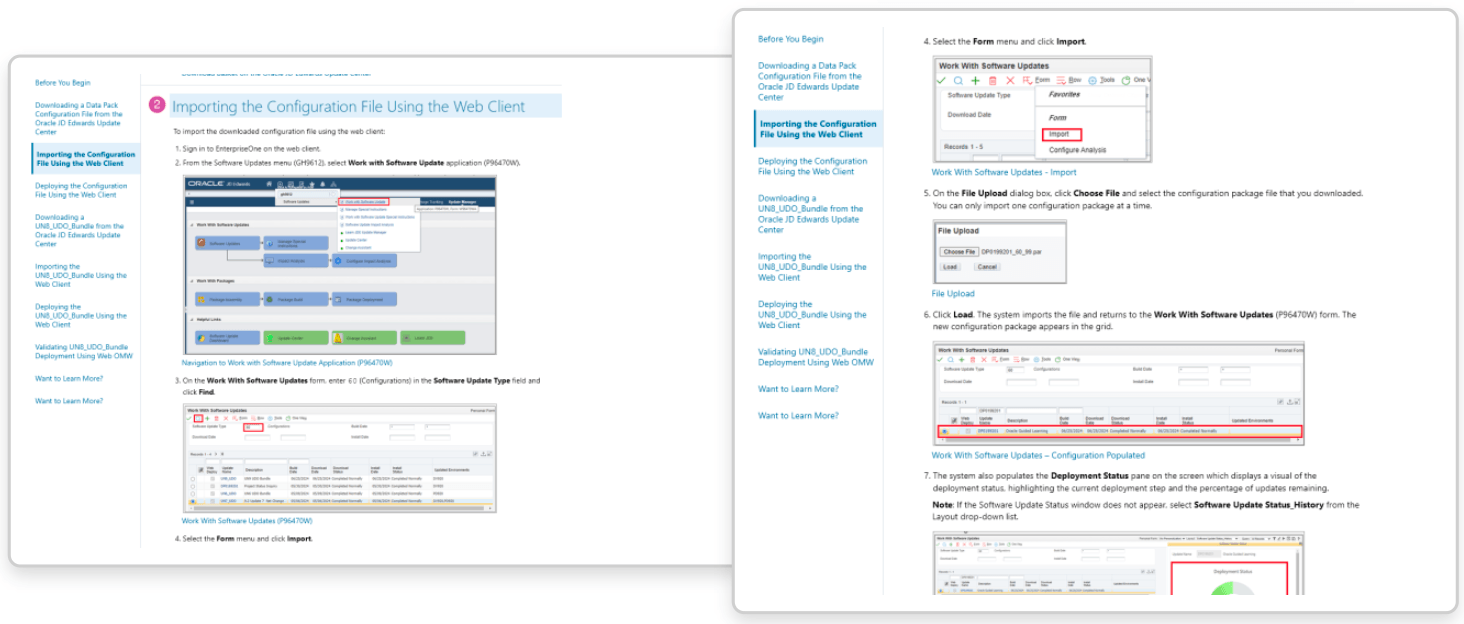
Beginning with Tools Release 9.2.9, organizations can import and deploy configuration packages directly through the EnterpriseOne web client using Work with Software Update (P96470W). This allows administrators to import a .par package, deploy it, and monitor deployment progress without using a traditional deployment server in supported environments.
For organizations that have adopted newer Tools Releases, this provides a simpler deployment experience while supporting remote patch and configuration management.
Option 2: Deploy Through Change Assistant
Change Assistant remains the traditional deployment method and continues to be widely used by many JD Edwards organizations.
In this approach, the .par archive is deployed through Change Assistant, typically using a deployment server. Beginning with Tools Release 9.2.9, organizations also have the option of deploying configurations through an Application Interface Server (AIS) connection, providing additional flexibility for supported environments.
The best deployment method depends on your current JD Edwards architecture, Tools Release, and administrative processes. Fortunately, both options provide a standardized way to deploy supported configuration.
When Should You Use the Configuration Assistant?
The Configuration Assistant isn't something you'll use every day. Instead, it becomes valuable whenever you need to move supported configuration between EnterpriseOne environments in a controlled and repeatable way.
Some common examples include:
- Deploying new User Defined Codes (UDCs) from development to testing or production
- Moving report versions between environments
- Migrating security records for users, roles, or public security
- Deploying task views for new business processes
- Rolling out standardized configuration across multiple companies or business units
- Packaging configuration for new implementations or environment refreshes
- Eliminating manual recreation of supported configuration
In each of these situations, manually rebuilding configuration increases the likelihood of inconsistencies between environments. By packaging supported configuration once and deploying it as needed, organizations can reduce manual effort while creating a more standardized deployment process.
Best Practices Before Deploying
Like any deployment tool, the Configuration Assistant is most effective when it's used carefully.
Oracle recommends several best practices that help reduce deployment risk and protect data integrity.
Always Back Up First
Before deploying any configuration package, create a backup of the target environment. If unexpected results occur during deployment, having a recent backup provides a reliable recovery option.
Understand Table Relationships
One of the most important considerations is understanding how JD Edwards tables relate to one another.
For example, loading Address Book records without their related child records can create data integrity issues and cause application errors. Before packaging business data, verify that all required table relationships are included.
Avoid Technical and System Tables
The Configuration Assistant is intended for business configuration—not system administration.
Oracle recommends avoiding technical tables such as Next Numbers, Central Objects, the Data Dictionary, and other system-managed tables that are better handled through other deployment methods.
Validate Before Production
Before deploying to production, compare the configuration, validate the package contents, and thoroughly test the deployment in a non-production environment. The built-in Compare Report can help identify differences before changes are applied.
Stay on the Same Release When Possible
Although the Configuration Assistant supports cross-release deployments, Oracle recommends deploying configurations between environments running the same EnterpriseOne release whenever possible. Differences in table structures between releases can lead to unnecessary risk.
Benefits of Using the Configuration Assistant
For many organizations, the biggest advantage of the Configuration Assistant isn't simply moving configuration—it's improving consistency.
Instead of relying on manual recreation, organizations can establish a repeatable process for deploying supported configuration across multiple environments.
Some of the primary benefits include:
- Less manual effort when moving supported configuration
- Fewer deployment mistakes caused by manual recreation
- More standardized deployment processes across environments
- Easier repeatability for future implementations and upgrades
- Better documentation through reusable configuration definitions
- Greater confidence that development, testing, and production environments remain aligned
As organizations continue modernizing their JD Edwards environments, tools that improve consistency and reduce manual work become increasingly valuable.
Final Thoughts
The JD Edwards EnterpriseOne Configuration Assistant is one of the more overlooked tools in the JD Edwards ecosystem.
For organizations that regularly move supported configuration between development, test, training, and production environments, it provides a more consistent and repeatable deployment process while reducing manual effort and the risk of configuration drift. Rather than recreating the same configuration over and over again, administrators can package it once and deploy it wherever it's needed.
Whether you're modernizing your JD Edwards environment, standardizing deployment processes, or looking to improve change management, the Configuration Assistant can help simplify how supported configuration moves through your organization.
At ERP Suites, we help organizations get more value from JD Edwards by implementing best practices that improve efficiency, reduce risk, and simplify ongoing administration. If you're evaluating the Configuration Assistant or looking to build a more repeatable deployment strategy, our JD Edwards consultants can help you determine the right approach for your environment.
Topics: