

Security changes in JD Edwards are a routine part of managing user access, roles, and permissions. But when those changes are made in an environment where production and non-production security share the same tables, even a seemingly minor adjustment can carry real business risk.
This is where segregating your security environment comes in. In JD Edwards, segregation means separating your production and non-production security tables. Instead of making a security change that immediately affects your live environment, your team can make the change in non-production first, test it, and validate that everything works as expected before moving it into production.
Without that separation, a change intended to improve security could inadvertently remove access an employee needs to process an order, complete a purchase, or keep another critical business process moving. When that happens, a security issue quickly becomes an operational one.
The ALLOut toolset is one option for creating and managing this separation within JD Edwards. It gives organizations a way to make and test security changes outside of production and then promote those changes into the live environment once they have been validated.
But what exactly does a segregated security environment look like, how does ALLOut support it, and when is this approach worth considering?
In this article, we'll break down how security segregation works in JD Edwards, the risks it can help address, and what organizations should know when deciding whether the ALLOut toolset makes sense for their environment.
How Does Security Segregation Work in JD Edwards?
By default, JD Edwards uses a single security table and a single role relationships table, creating a global security setup. This means a security change can affect users in your live production environment.
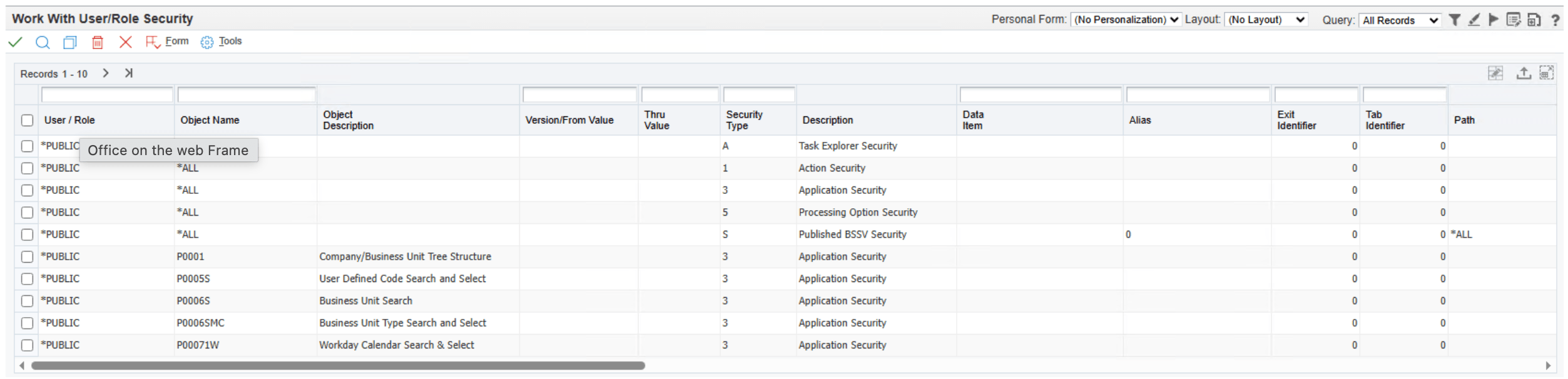
Segregating your security environment creates separate sets of security tables for production and non-production. With that separation in place, your team can make a change in non-production, test it, and confirm that users still have the access they need before moving the change into production.
For example, if you need to adjust the permissions associated with a role, you can test those changes without immediately affecting the employees who rely on that role to do their jobs.
Think of non-production as your testing ground. Your team can make necessary security changes without turning your live environment into the place where you find out whether those changes work.
What Is the ALLOut Toolset?
ALLOut is a third-party security and compliance toolset that integrates with JD Edwards. Users access ALLOut through JDE, allowing them to manage security without working from a completely separate platform.
The toolset doesn't introduce new types of JD Edwards security. Instead, it provides a more efficient way to manage the security and access already available within JDE. It also gives organizations additional reporting capabilities to better understand user and role access, along with segregation of duties reporting and mitigation tools that aren't available natively in JD Edwards.
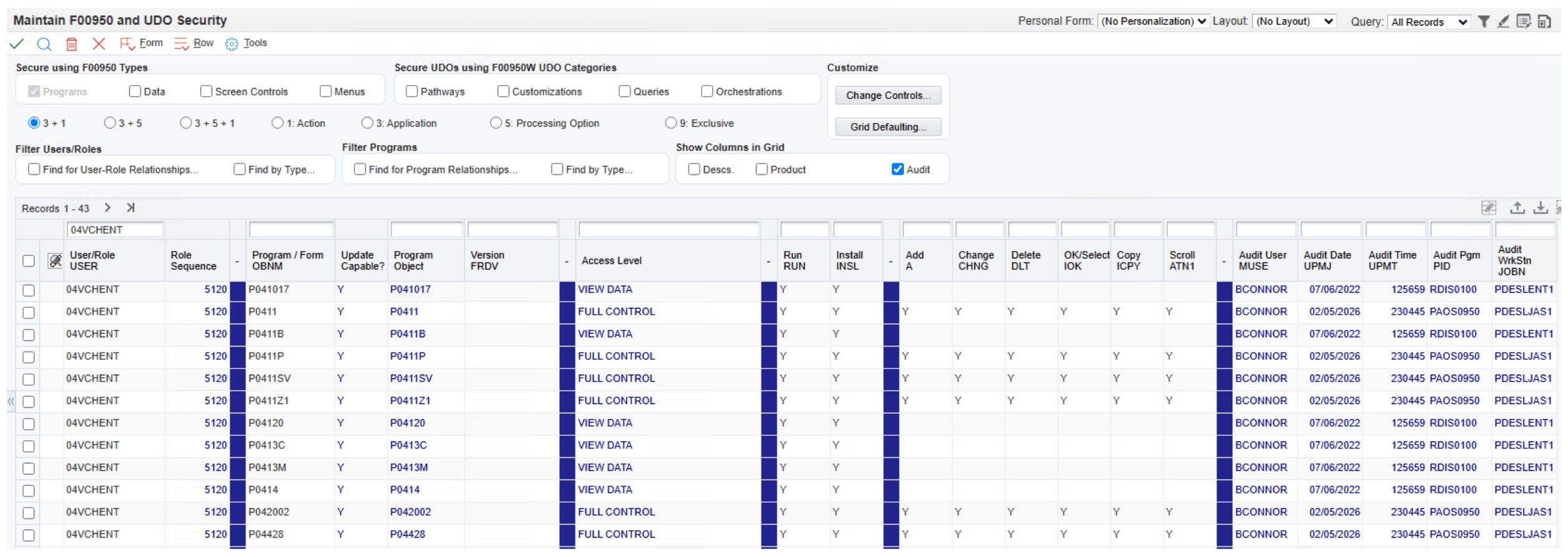
For organizations with segregated security environments, ALLOut also provides tools for managing how approved security changes move between non-production and production.
In other words, ALLOut isn't replacing JD Edwards security. It's giving your team more control over how that security is managed.
Why Can a Single Security Environment Create Business Risk?
When production and non-production share the same security tables, there is less room for error. A security change that doesn't work as intended can affect live users and the business processes they depend on.
Imagine adjusting access for a role only to discover that users can no longer process sales orders. Or a permission is removed that prevents an employee from completing a purchase order or moving a shipment forward.
Those may start as security problems, but their impact doesn't stay within your IT department. A delayed shipment can mean a truck leaves without your product. An order that can't be processed can delay billing. Eventually, an incorrect security change can have a financial impact on the business.
Segregating production and non-production gives your team an opportunity to catch those problems before they reach live users and disrupt a business process.
That's why security segregation is ultimately about more than controlling access. It's about reducing the risk that the way you manage security creates problems for the rest of the business.
How Does ALLOut Help Manage Security Changes Between Environments?
Separating production and non-production gives you a place to safely make security changes, but you still need a reliable way to move those changes into your live environment.
That's where ALLOut's promotion process comes into play.
Let's say your team changes the security associated with an accounting role in non-production. Before that change reaches your live users, you can test the updated role and validate that employees still have the access they need to do their jobs.
Once the change has been tested, ALLOut can compare the role between your non-production and production environments and promote the updated security into production.
This helps remove another potential source of risk: manually recreating the same change in two environments. With a manual process, a change might be completed in non-production but missed or implemented differently in production, leaving the two environments out of sync.
ALLOut's promotion process also provides output showing what was changed, creating an auditable trail of the security changes that were moved into production.
The result is a more controlled process: make the change, test it, validate it, and then promote it into production with a record of what was done.
What Can Security Segregation Look Like in Practice?
Consider an organization that had accumulated roughly 1,800 JD Edwards user accounts over time. Without a regular cleanup process in place, expired, inactive, and outdated accounts remained in the system—and some potentially still had access to JDE.
As part of a larger security project, the organization used ALLOut to help identify those accounts and establish a process for reviewing them. Accounts that hadn't been used for an extended period could be flagged, validated internally, and removed when they were no longer needed.
Over the course of the cleanup, the organization reduced its user count from roughly 1,800 to fewer than 600, eliminating more than 1,200 outdated or inactive accounts.
At the same time, segregating production and non-production gave the team a safer environment to clean up unnecessary or duplicate security without immediately affecting live users.
The example highlights an important benefit of segregation: organizations don't have to choose between cleaning up their security and protecting day-to-day operations. They can take a more controlled approach to both.
What Are the Benefits of Segregating Your JD Edwards Security Environment?
The biggest benefit of segregating your security environment is control. Instead of making changes directly in an environment your business depends on every day, your team has an opportunity to catch potential problems before they reach production.
That approach can help your organization:
- Reduce operational risk: Catch potential security issues before they disrupt live business processes.
- Create a more controlled change process: Establish a defined path for moving security updates into production.
- Improve consistency: Reduce missed or mismatched changes between environments.
- Strengthen auditability: Maintain a record of changes made to production security.
- Improve visibility: Better understand and manage user and role access.
Ultimately, these benefits point back to the same goal: giving your organization greater control over security changes while reducing the risk those changes introduce to the business.
Is the ALLOut Toolset Right for Your Organization?
Not every JD Edwards environment looks the same, and implementing another tool shouldn't be a decision you make simply because it's available. The better question is whether your current approach to managing security gives you enough control over the risks that come with making changes.
Start by looking at your existing process:
- Are your production and non-production security environments separated?
- Where do you currently make and test security changes?
- How are approved changes moved into production?
- Does that process rely heavily on manual updates or tracking?
- Can you easily see what security changes were made and what reached production?
- How easily can you review user and role access?
- Do you have a consistent process for identifying accounts or access that may no longer be necessary?
If you're confident in your answers, you may already have processes that effectively manage many of these risks.
If those questions expose gaps, manual processes, or areas where you don't have enough visibility, a tool like ALLOut may be worth evaluating. The goal isn't to add technology for the sake of adding technology. It's to determine whether additional controls can help your organization manage JD Edwards security with less risk.
Security Segregation Is Ultimately About Managing Risk
Segregating your JD Edwards security environment isn't about restricting the business or making security more complicated. It's about managing risks.
The right security approach should give your organization enough control to make necessary changes without creating unnecessary risk for the people and processes that depend on JD Edwards every day. ALLOut offers one way to build that control into how your organization manages security.
If you're unsure whether your current JD Edwards security setup is creating unnecessary risk, ERP Suites can help you evaluate your existing environment and processes, identify potential gaps, and determine whether the ALLOut Toolset makes sense for your organization.
