

With Oracle moving away from 32-bit support for JD Edwards EnterpriseOne, one of the first questions many organizations need to answer is also one of the simplest:
Are we actually running 32-bit or 64-bit JDE?
You may already know the answer. But if your environment has been around for years, has gone through multiple upgrades, or is managed by several different people, it may not be immediately obvious.
Fortunately, there are a few ways to check. The easiest place to start is Server Manager, but your server directories and Tools Release can provide additional confirmation.
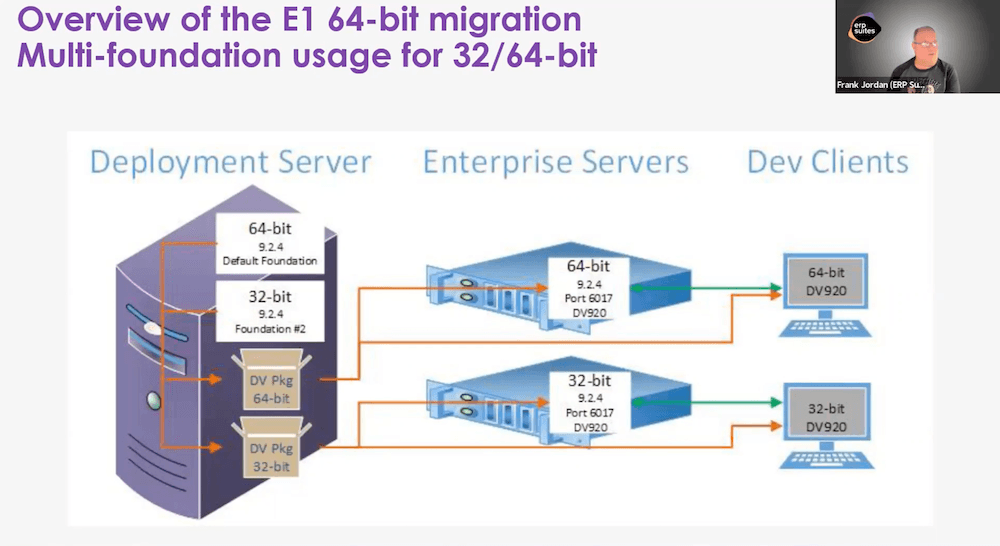
There is one thing to keep in mind: some older JD Edwards environments can contain a mix of 32-bit and 64-bit components.
That's why the goal isn't simply to find "32-bit" or "64-bit" somewhere in your environment. It's to understand what your JD Edwards environment is actually running today.
1. Check Server Manager
The fastest place to start is the JD Edwards Server Manager Management Console.
Server Manager provides information about the software running on your JD Edwards servers, including the software component version associated with your Enterprise Server.
If you have access to Server Manager, start by selecting your Enterprise Server instance and looking at its software component information. This is typically something a JD Edwards CNC administrator or the person responsible for managing your JDE servers would have access to. If that's not you, you can ask that person to check it for you.
You're looking for one of two indicators:
- x64 or 64-bit indicates a 64-bit component.
- x86 or 32-bit indicates a 32-bit component.
Oracle's documentation, for example, shows a 32-bit Enterprise Server software component displayed as "EnterpriseOne Enterprise Server 9.2.3.0 X86."
If yours shows x64, you're looking at a 64-bit Enterprise Server.
For many organizations, this may be enough to answer the immediate question. But if you're on an older Tools Release or aren't sure whether every part of the environment was migrated together, it's worth performing another check.
2. Check the Enterprise Server File Directory
Another way to identify your JDE bitness is to look at the files installed on the server itself.
If you have access to your Enterprise Server, navigate to the main system directory where the JD Edwards engine files are stored.
Look for the executable folder:
- bin32 indicates 32-bit binaries.
- bin64 indicates 64-bit binaries.
Think of this as another piece of evidence about what's actually installed on that server.
If you're not someone who normally works directly with your JD Edwards servers, you don't need to start digging through directories yourself. Your CNC administrator or whoever manages your JDE environment should be able to perform this check for you.
The important thing is knowing what to ask them to look for.
3. Check Your Tools Release
Your Tools Release can also help you determine whether you're running 32-bit or 64-bit.
If you're running Tools Release 9.2.5.x or earlier, your Tools Release alone may not give you the answer. Those releases could support configurations involving either 32-bit or 64-bit components, so you'll want to use Server Manager or your server directories to verify your environment.
Beginning with Tools Release 9.2.3, JD Edwards could support both 32-bit and 64-bit configurations.
Beginning with Tools Release 9.2.6, however, Oracle moved forward with the newer 64-bit architecture path.
So, as a simple rule of thumb:
| Your Tools Release | What It Tells You |
| 9.2.5 or Earlier | Could involve 32-bit or 64-bit components. Check Further. |
| 9.2.6 or Newer | You’re on the newer 64-bit path. |
Can Parts of My JDE Environment Be 32-Bit While Others Are 64-Bit?
Yes.
This is important to understand if your checks seem to give you conflicting answers.
JD Edwards has supported mixed configurations as customers transitioned to 64-bit. That means one part of your environment could be running 64-bit while another still contains 32-bit components.
Finding a 32-bit component doesn't automatically mean your entire JD Edwards environment is still running on 32-bit.
That's why it's important to pay attention to which server or component you're checking rather than treating one "x86" or "x64" label as an answer for your entire JDE environment.
If different checks give you different answers, your environment may have a mixed configuration. That doesn't necessarily mean you should update individual components on their own. First, confirm which parts of your environment are still 32-bit and whether they are affected by Oracle's changing support before deciding what needs to be updated.
What If the Checks Don't Give Me a Clear Answer?
If Server Manager, your server directories, and your Tools Release all point to the same answer, determining your bitness should be relatively straightforward.
If they don't, that's when it's worth having someone familiar with JD Edwards architecture take a closer look.
A CNC administrator can review the different parts of your JD Edwards environment to determine whether you're fully 32-bit, fully 64-bit, or operating with a mixed configuration.
You don't necessarily need a lengthy assessment just to answer the question. The goal is simply to make sure you're basing your next decision on an accurate picture of your environment.
Final Thoughts
Knowing whether your JD Edwards environment is running 32-bit or 64-bit may sound like a small technical detail, but it's an important starting point for understanding what Oracle's changing 32-bit support means for your organization.

Once you know where you stand, you can determine whether any additional planning or migration work is actually necessary.
If you're unsure what you're running or what your findings mean, ERP Suites can help assess your JD Edwards environment and determine where 32-bit components may still exist. From there, you can decide what, if anything, needs to change.
Topics:

.png?width=960&height=540&name=Blog%20Images%20(50).png)